How to Create an Interactive Event Map for Your Next Event
Planning an event—whether it’s a festival, sports race, conference, or market—comes with one challenge every organizer faces: helping people find their way. That’s where a well-designed event map makes all the difference.
In this article, I’ll show you how to create your own interactive event map with multiple markers, routes, and custom shapes. We will use a case study from the Formula Grand Prix in Monaco and the service MakeMeMap, a tool designed to help you create, share, and embed interactive maps that work seamlessly on both desktop and mobile.
What Is an Interactive Event Map?
An interactive event map is a digital tool that displays the layout and locations of key features at your event, such as:
- Entrances and exits
- Seating zones and grandstands
- Food and drink stalls
- Emergency services
- Exhibitor booths
- Stages and activity zones
- Routes and directions
- Restrooms (WCs)
Unlike a static image, an interactive map allows users to zoom in, see their live location, click for details, and filter by category.
Do I Need a Map for My Event?
In short: Yes. A high-quality event map helps you:
- Improve the attendee experience: Navigate with ease.
- Reduce staff workload: Fewer repetitive questions for your team.
- Prevent confusion and crowding: Streamline the flow of foot traffic.
- Increase engagement: Keep visitors at your event areas longer.
- Promote partners: Highlight vendors and sponsors via clickable points.
If your map is embeddable or shareable, it also helps build excitement and awareness before the event even begins.
Case Study: Formula Grand Prix in Monaco
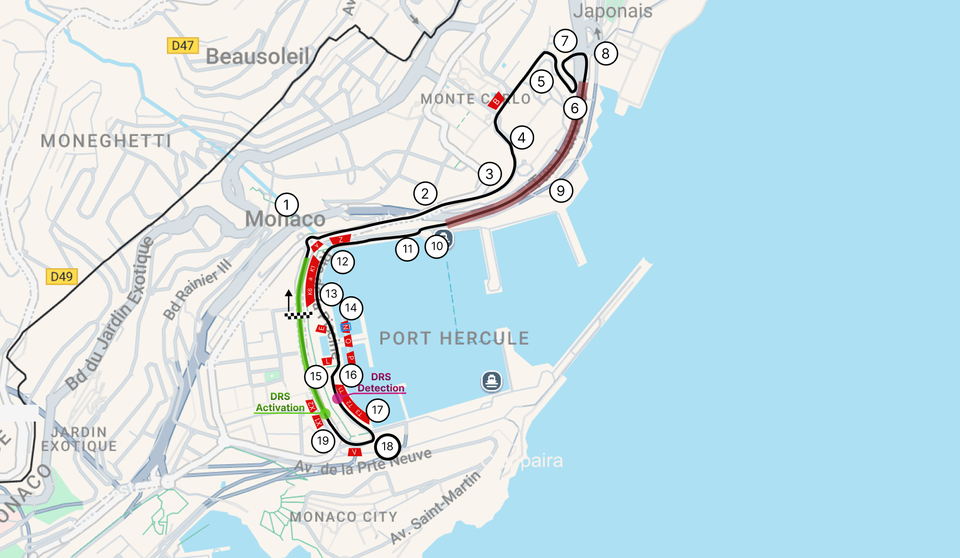
Let’s look at the iconic Formula Grand Prix in Monaco. Organizers must communicate dozens of key locations across a dense city circuit. On their custom map, they include:
- Grandstands: Specific seat numbers and access points.
- Points of Interest: Landmarks and viewing spots.
- Hospitality: VIP zones and lounges.
- Track Layout: Pit lanes, paddocks, and the circuit itself.
An interactive map lets spectators explore the circuit layout ahead of time, locate their seats faster, and plan their race day efficiently.
How to Build Your Event Map
To build our map, we will use MakeMeMap. It allows you to create interactive maps with zero coding and includes a built-in CMS to manage places and routes easily.
- Create an Account: Sign up at makememap.com. They offer a generous free plan and predictable pricing.
- Add a New Map: Click the "+" icon to create a new map. You will then be redirected to the Map Editor.
- Add Routes: For the Monaco example, we add two routes: the full track layout and the specific tunnel section.
- Add Track Points: Mark turns and landmarks. To keep it organized, use the "Auto-numbering" feature in the category settings to label your turns automatically.
- Define Seating Zones: Use custom shapes to draw grandstands and add text labels on top to guide visitors.
- Final Details: Add markers with custom images to show the loop direction and the start/finish gates.
You can find more information about map features in our knowledge base at https://makememap.com/docs/overview. If you have any questions, feel free to send us a message. We don’t use AI bots in our support, so you’ll receive a response from a real human.
Publishing and Privacy
Your map is now ready to be shared on your website, social media, or via email. One of the biggest advantages of MakeMeMap is privacy. Unlike embedded Google Maps and Google My Maps, it doesn’t collect user data, meaning you don’t need to ask for extra cookie and user data permissions.
Pricing is straightforward:
- Free: Up to 100 visitors per month.
- Pro: Just €5/month for up to 5,000 visitors (roughly 160 visitors per day) with unlimited markers, custom data, different styles.
With MakeMeMap, you can design a professional event map in minutes. If you have questions or feedback, feel free to reach out to the team at [email protected].